Imagine this: You saved money for months, went to the store, and bought a brand-new 2026 model smartphone for ₹18,000. On paper, it has “8GB RAM” and a “Fast Processor.”
But when you open WhatsApp or YouTube, the phone hangs for 2 seconds. Your old phone from 2023 actually feels faster!
Is your phone defective? No. You have been hit by the “Ghost Downgrade.”
1. The Trap: Why is this happening?
As we discussed in our last post, the price of RAM and Storage chips has increased by 170%.
To keep the price of the phone low (under ₹20,000), brands like Samsung, Realme, and Poco are making a secret trade. They are giving you the same amount of RAM (8GB), but they are using cheaper, older technology that is 50% slower.
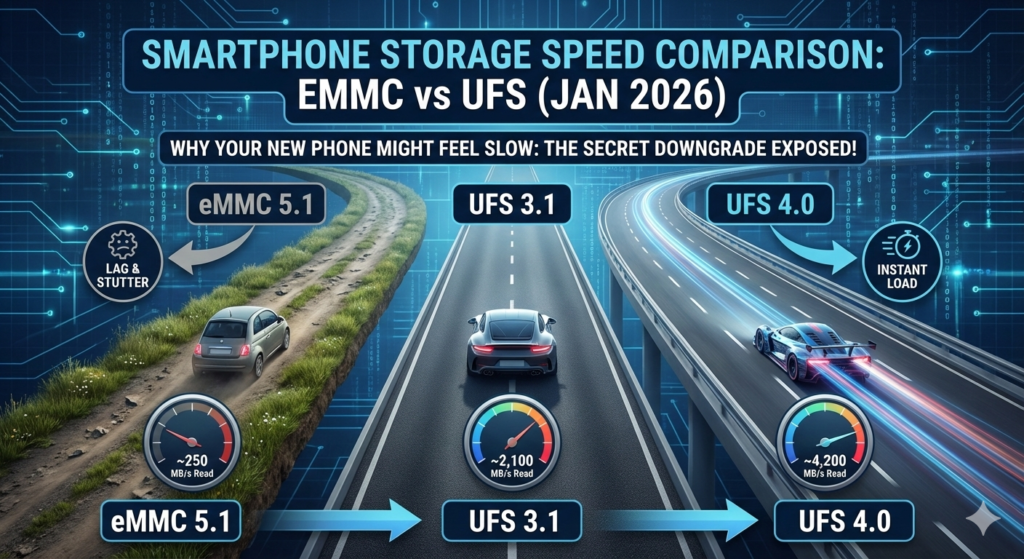
| Storage Type | Read Speed (How fast apps open) | Write Speed (How fast files save) | Verdict for 2026 |
| UFS 4.0 | ~4,200 MB/s | ~2,800 MB/s | The Best: Found in flagships. Instant performance. |
| UFS 3.1 | ~2,100 MB/s | ~1,200 MB/s | Very Good: The “Sweet Spot” for mid-range phones. |
| eMMC 5.1 | ~250 – 300 MB/s | ~125 MB/s | The Danger Zone: Slow and outdated. Causes lag. |
2. The Two “Secret” Tricks to Watch Out For
Trick A: The “Slow” Storage (eMMC vs. UFS)
Think of storage like a road. UFS 3.1 or 4.0 is a 6-lane highway. eMMC is a narrow village road.
- In 2024, most phones had UFS.
- In 2026, many budget phones (like the new Poco C85 or Redmi 15C) have quietly moved back to eMMC 5.1.
- Result: Apps take forever to open, and the phone “stutters” when you scroll.
Trick B: The “Old” RAM (LPDDR4X vs. LPDDR5)
Many new phones are using LPDDR4X RAM (from 2021) instead of the faster LPDDR5. It’s like putting an old engine in a new car body. It looks new, but it can’t run fast.
3. The Biggest Lie: “Virtual RAM” or “RAM Expansion”
You will see boxes saying “16GB RAM” (8GB + 8GB Virtual).
Stop! This is a marketing trick. Virtual RAM uses your slow storage memory to act like RAM. It is 10 times slower than real RAM. In fact, keeping “Virtual RAM” turned ON can actually make your phone slower and reduce its life.
How to Check Your Phone in 2 Minutes
Don’t trust the box. Do this before the return window closes:
- Download “DevCheck” or “CPU-Z” from the Play Store.
- Go to the “Hardware” or “Storage” tab.
- Look for “Storage Type”.
- If it says UFS 2.2 or 3.1 — You are safe! ✅
- If it says eMMC — Your phone will lag in 6 months. ❌
- Look for “RAM Type”.
- If it says LPDDR5 — Excellent! ✅
- If it says LPDDR4X — It’s average for 2026. ⚠️
Honest Recommendations: 2026 Phones with “Real” Speed
If you are buying a phone right now, these models are still using high-quality parts:
- Redmi Note 15 5G: Uses UFS 2.2 (Decent for the price).
- Realme Narzo 90X: One of the few budget phones still using UFS storage.
- Motorola Edge 70: Great hardware with almost zero “Ghost Downgrades.”
Our Advice: Always check the “Storage Type” before buying. A phone with 6GB RAM + UFS Storage is always faster than a phone with 12GB RAM + eMMC Storage.